

Automation Cheatsheet
Here’s a cheatsheet—a quick overview and reference—for the Webfuse Automation API.
Extension and Automation API Namspaces
Section titled “Extension and Automation API Namspaces”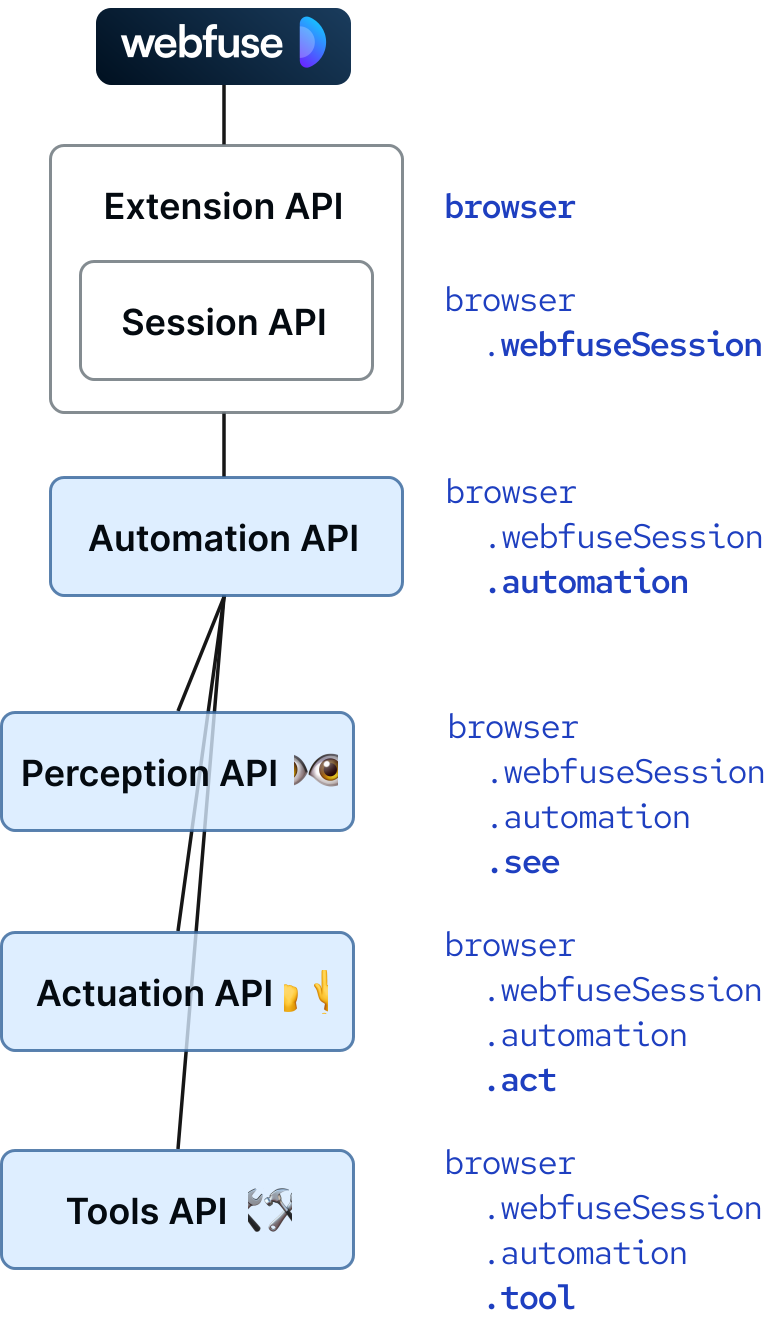
Perceive the Current Page
Section titled “Perceive the Current Page”// DOM-basedawait browser.webfuseSession .automation .see .domSnapshot()
// Vision-basedawait browser.webfuseSession .automation .see .guiSnapshot()Act in the Current Page
Section titled “Act in the Current Page”// DOM-based (by CSS selector)await browser.webfuseSession .automation .act .click("button#submit")
// Vision-based (by point coordinate)await browser.webfuseSession .automation .act .click([374, 1020])Downsample a Perceived DOM Snapshot
Section titled “Downsample a Perceived DOM Snapshot”// DOM-basedconst snapshot = await browser.webfuseSession .automation .see .domSnapshot()
const snapshot32KTokens = await browser.webfuseSession .tool .downsample(snapshot);Downsampling is a technique to ‘compress’ a DOM snapshot:
<section class="container" tabindex="3" required="true" type="example"> <div class="mx-auto" data-topic="products" required="false"> <h1>Our Pizza</h1> <div> <div class="shadow-lg"> <h2>Margherita</h2> <p> A simple classic: mozzarela, tomatoes and basil. An everyday choice! </p> <button type="button">Add</button> </div> <div class="shadow-lg"> <h2>Capricciosa</h2> <p> A rich taste: mozzarella, ham, mushrooms, artichokes, and olives. A true favourite! </p> <button type="button">Add</button> </div> </div> </div></section>…could be downsampled to:
<section tabindex="3" class="container" required="true"> # Our Pizza <div class="shadow-lg"> ## Margherita A simple classic mozzarela tomatoes and basil <button type="button">Add</button> ## Capricciosa A rich taste A true favourite <button type="button">Add</button> </div></section>The Agent and Browser Ecosystem
Section titled “The Agent and Browser Ecosystem”| Webfuse | Playwright | Puppeteer | |
|---|---|---|---|
| Human-like (natural) pointer | ✔️ | ❌ | ❌ |
| Human-like (natural) typing | ✔️ | ✔️ | ✔️ |
| Cross-frame targeting | ✔️ | ❌ | ❌ |
| Cross-shadow targeting | ✔️ | Manual | Manual |
| GUI snapshots | ✔️ | ✔️ | ✔️ |
| DOM snapshots | ✔️ | ✔️ | ✔️ |
| DOM downsampling | ✔️ | ❌ | ❌ |
| Accessibility tree | ✔️ | Partial | ❌ |
| LLM-based agents focus | ✔️ | ❌ | ❌ |
| Remote browser | ❌ | ✔️ | ✔️ |
| Embedded/user browser | ✔️ | Stream | Stream |
| MCP-ready | ✔️ | Separate | Separate |