

Mastering Perception
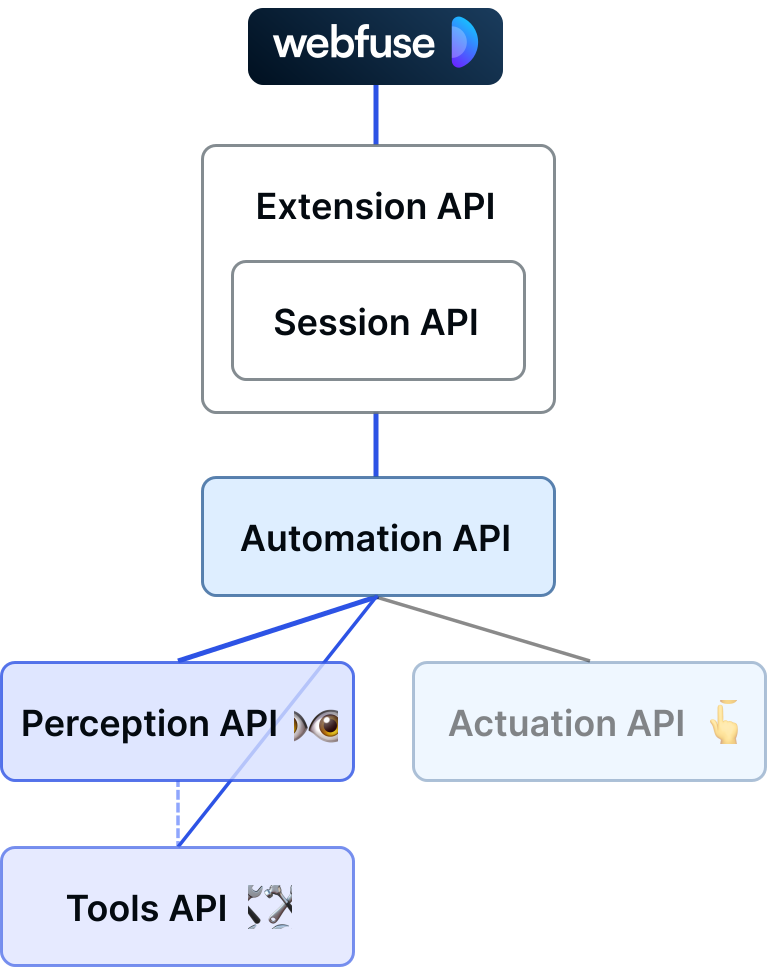
Metaphorically, Webfuse gives universal AI agents for the web eyes 👁️ and hands 👆️.
By eyes, we mean that Webfuse provides tools to perceive a web page in different ways that allow AI models (commonly LLMs) to contextualize the inherent UI. Based on that context, those AI models are able to suggest certain actions in the page to achieve a certain goal—here the hands come in at a later point in time.
Perception tools of the Automation API are available from the sub namespace automation.see.
Perceiving the Web Through Snapshots
Section titled “Perceiving the Web Through Snapshots”Perceiving the web for AI models that are consulted over a network, context must be serializable. A more handy, common term for serialized web page state is ‘snapshot’. In fact, a snapshot can be provided right as LLM context.
GUI Snapshots: Screenshots
Section titled “GUI Snapshots: Screenshots”A GUI snapshot corresponds to a screenshot. It captures the web page visually, just as humans primariliy perceive it. Research has supported that GUI snapshots alone are not a powerful means of LLM input with regard to fueling web agents. However, Webfuse’s Automation AI provides a method to take a GUI snapshot:
const screenshot = await browser.webfuseSession .automation .see .gui();DOM Snapshots: Stateful HTML
Section titled “DOM Snapshots: Stateful HTML”A DOM snapshot captures a web page on code level. It serializes it as HTML, which leverages great code interpretation abilities of LLMs. Webfuse provides some cutting edge DOM snapshot capabilities that boost LLM-based web agent success. In its simples form, a DOM snapshot can be taken as follows:
const html = await browser.webfuseSession .automation .see .domSnapshot();A Note About DOM Snapshot Size
Section titled “A Note About DOM Snapshot Size”LLM context size is an economic factor, particularly with iteration-based web agents. Web page snaphots should hence be concise. In fact, plain DOM snpahots often times scale right out of model context (e.g., of text-heavy Wikipedia articles). For that reason, DOM snapshots have not always been a feasible choice when developing web agents. Instead, utilizing the accessibility tree of a web page has been a popular choice: it is an evident technical representation, whic is much less verbose than its DOM equivalent when serialized.
Computing the accessibility tree for a web page represents a feature built-in with every major web browser. Its original purpose, which is favorable for web agents, too, is to give a DOM a meaningful equivalent with regard to its inherent UI. Accessibility trees are then used by plug-in tools, such as screen readers. Accessibility trees are not part of Web APIs, but only Browser APIs. Thus, it is exclusive to browser-native tools, such as browser extensions. The Webfuse Automation API implements a tool to compute an accessibility tree from a DOM snapshot:
const html = await browser.webfuseSession  .automation  .see  .domSnapshot();
const accessibilityTree = await browser.webfuseSession  .automation  .tool  .computeAccessibilityTree(domSnapshot);
DOM Downsampling to Constrain Snaphot Size
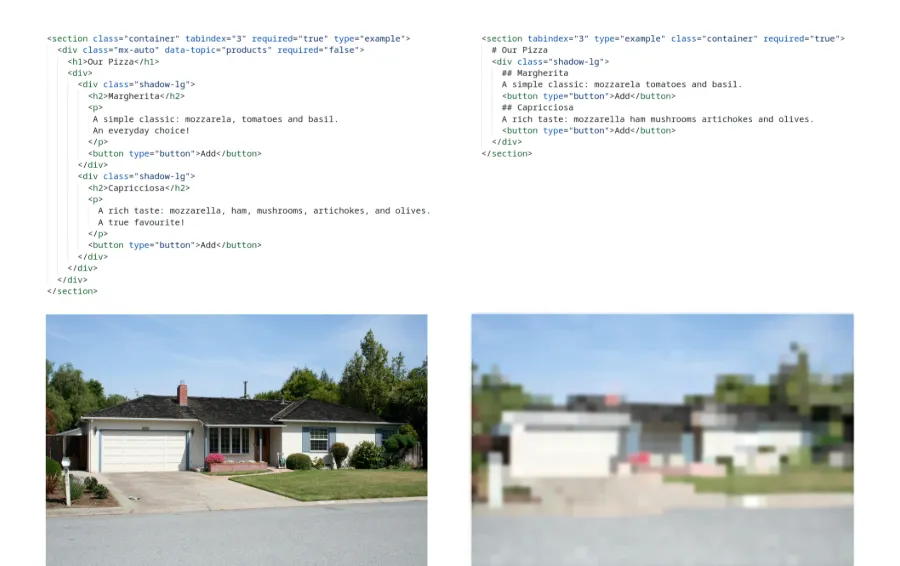
Section titled “DOM Downsampling to Constrain Snaphot Size”While accessibility trees are handy, quality strongly varies across pages. LLMs excel at intepreting code, and research supports abilities to navigate a UI inherent to HTML. That said, HTML-compliant DOM snapshots are promising for developing robust web AI agents. To mitigate the size issue, we recently mapped the concept of downsampling to DOMs, and supported it as a useful means of downsizing DOMs for use with LLM-based web agents. The key assumption is that it ‘compresses’ HTML wholistically, retaining its overall UI features to a high degree. You can picture it much like image compression:
const html = await browser.webfuseSession  .automation  .see  .domSnapshot();
const downsampledHTML = await browser.webfuseSession  .automation  .tool  .downsample(domSnapshot);
console.log(html)
<section class="container" tabindex="3" required="true" type="example"> <div class="mx-auto" data-topic="products" required="false"> <h1>Our Pizza</h1> <div> <div class="shadow-lg"> <h2>Margherita</h2> <p> A simple classic: mozzarela, tomatoes and basil. An everyday choice! </p> <button type="button">Add</button> </div> <div class="shadow-lg"> <h2>Capricciosa</h2> <p> A rich taste: mozzarella, ham, mushrooms, artichokes, and olives. A true favourite! </p> <button type="button">Add</button> </div> </div> </div></section>console.log(downsampledHTML)
<section tabindex="3" class="container" required="true"> # Our Pizza <div class="shadow-lg"> ## Margherita A simple classic mozzarela tomatoes and basil <button type="button">Add</button> ## Capricciosa A rich taste A true favourite <button type="button">Add</button> </div></section>See the Web Without Walls
Section titled “See the Web Without Walls”With Webfuse it is possible to see beyond shadow root and iframe boundaries:
Cross-frame snapshots (crossframe = true) will have all iframe contents inlined, e.g.:
<body> <h1>Parent</h1> <iframe src="/child"> <body> <h1>Child</h1> </body> </iframe></body>Cross-shadow snapshots (crossshadow = true) will have all shadow root contents inlined, e.g.:
<div> <custom-element> <shadow-root> <strong>Shadow</strong> <p> <slot></slot> </p> </shadow-root> <b>Slotted</b> </custom-element></div>Work with Webfuse IDs
Section titled “Work with Webfuse IDs”Using the DOM snapshot option inlineWebfuseIDs, the snapshot will contain, for each element, an HTML pseudo attribute WF-ID that relates with a per-Tab unique ID. This Webfuse ID can later be used to target elements with actuation calls (e.g., click()).
<body WF-ID="2"> <h1 WF-ID="3">Parent</h1> <iframe src="/child" WF-ID="1"> <body WF-ID="1-1"> <custom-element WF-ID="1-2"> <shadow-root> <strong WF-ID="1-3">Shadow</strong> <p WF-ID="1-4"> <slot></slot> </p> </shadow-root> <b WF-ID="1-5">Slotted</b> </custom-element> </body> </iframe></body>